Custom & Multi-Pipeline Support
No two businesses sell the same way. Map your unique sales process in just a few clicks. ClientZCRM adapts to how you work — not the other way around.
Book a Demo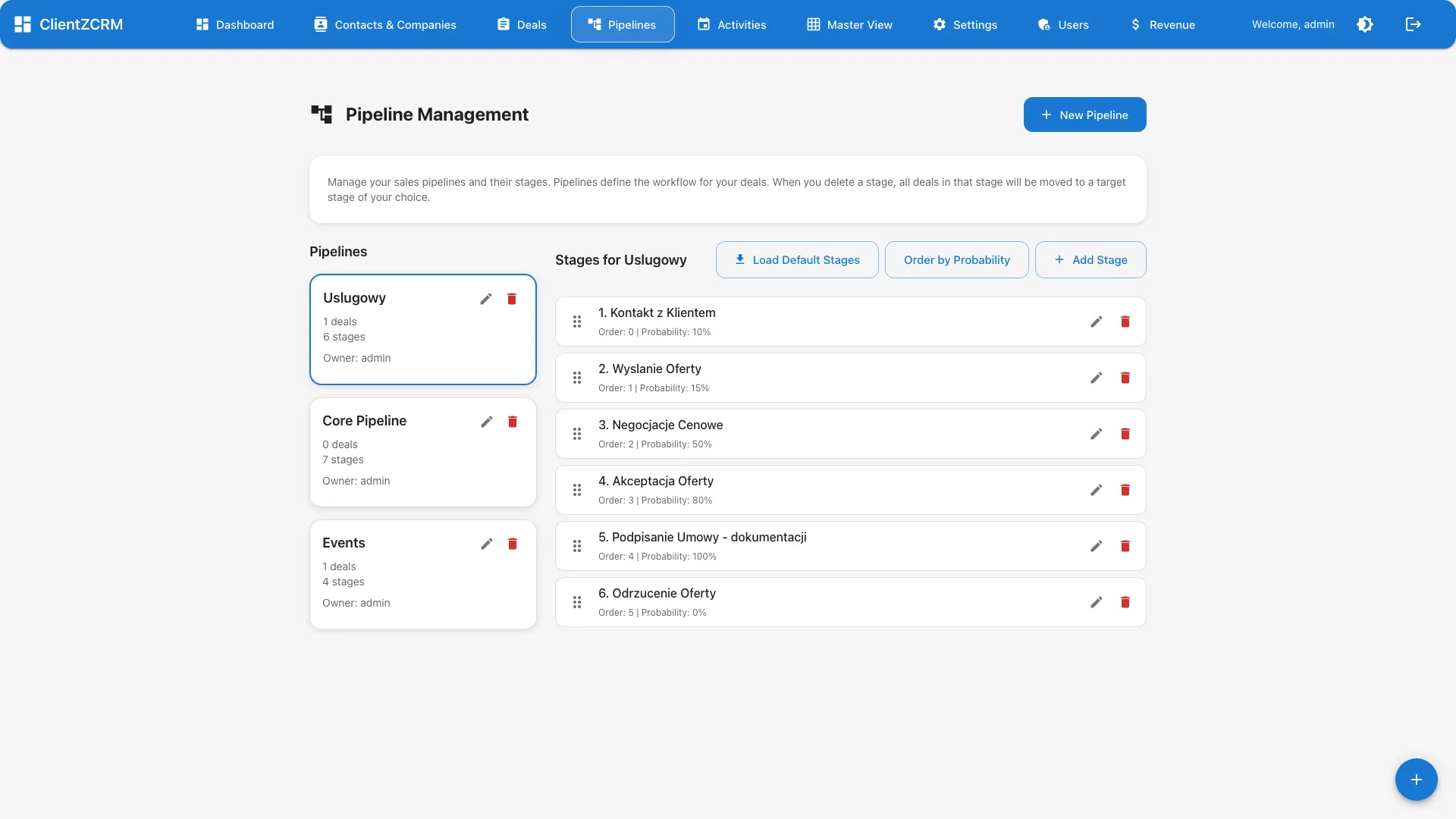
No two businesses sell the same way. Map your unique sales process in just a few clicks. ClientZCRM adapts to how you work — not the other way around.
Book a Demo
Most CRMs force you into a rigid, one-size-fits-all pipeline. But businesses selling multiple products, serving different segments, or running inbound and outbound simultaneously need different processes for each. Shoehorning everything into a single pipeline creates confusion, inaccurate reporting, and lost deals.
Define pipeline stages that match how your team actually sells. Whether you have 3 stages or 12, ClientZCRM lets you name, order, and configure each one to reflect your real-world process. No predefined templates you are forced to work around. Add probability weights, expected durations, and required fields per stage so your pipeline captures meaningful data at every step. When your sales process evolves — and it will — your pipeline evolves with it in seconds.
Run separate pipelines for different products, customer segments, or sales motions. A pipeline for new business acquisition looks different from account expansion or partnership development. Create dedicated pipelines for each, with stages tailored to that specific workflow. Each pipeline tracks its own metrics, conversion rates, and velocity independently, giving you clean reporting without cross-contamination between fundamentally different sales processes.
Start a new pipeline from scratch or clone an existing one and adjust. When launching a new product line or entering a new market, duplicate your proven pipeline structure and customize it for the new context. Takes seconds, not hours of setup. Your team can experiment with different stage configurations without risking the pipelines already running live deals. Once the new structure is validated, roll it out to the rest of the team with a single action.
The AI Assistant learns the patterns and typical progression of each pipeline. It understands that a "Technical Review" stage in your enterprise pipeline has different implications than "Demo Scheduled" in your SMB pipeline. This context-awareness makes AI suggestions more relevant and actionable. Deal scoring, next-step recommendations, and risk alerts are all calibrated to the specific pipeline a deal lives in — not a generic model applied uniformly across your entire sales operation.
How many pipelines can I create?
There is no hard limit on the number of pipelines. Create as many as your business needs — separate pipelines for different products, segments, regions, or sales motions.
Can I change pipeline stages after deals are in progress?
Yes. You can add, rename, or reorder stages at any time. Existing deals remain in their current position and can be moved to new stages as needed.
Does the AI work across all pipelines?
Yes. The AI Assistant monitors all your pipelines simultaneously and provides context-aware suggestions for each one. It learns the patterns specific to each pipeline's workflow.
Watch how custom pipelines help sales teams map their unique process and manage multiple sales motions from one place. Book a live walkthrough.
Book a Demo